6. Meta
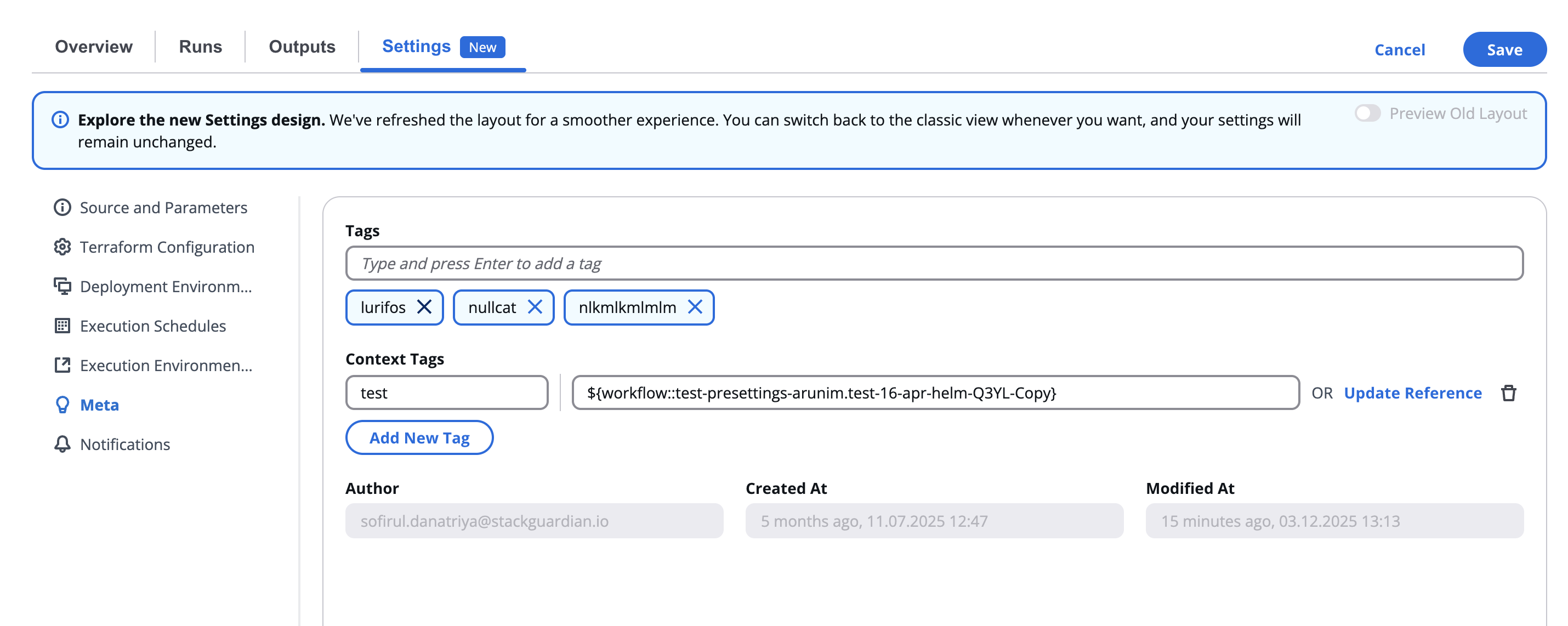
The Meta section provides metadata management for the workflow, allowing tagging, context identification, and visibility into author and timestamp details.
6.1 Overview
This section appears under Settings → Meta and is designed to help organize workflows, making them easier to search, categorize, and audit.
Metadata fields are typically informational and do not affect workflow execution directly.
6.2 Tags
Tags help classify workflows by technology, purpose, or environment.
You can add, remove, or modify tags using the text input field.
| Field | Description |
|---|---|
| Tags | Add keywords that describe the workflow (e.g., terraform, ansible, production, aws). Press Enter after typing each tag. |
| Remove Tag (x) | Removes a tag from the list. |

💡 Tags improve discoverability when searching workflows within large organizations.
6.3 Context Tags
Context Tags provide additional metadata or grouping beyond standard tags — for instance, linking workflows that belong to the same project, client, or environment set.
| Field | Description |
|---|---|
| Add New Tag | Creates a new context-specific tag. |

Use context tags to track workflows related to shared infrastructure, cost centers, or automation families.
For more detailed instructions on creating references, refer to the Reference Variables documentation.
6.4 Author and Timestamps
At the bottom of the section, the author and creation/modification metadata are displayed in read-only format.
| Field | Description |
|---|---|
| Author | The user who created the workflow (e.g., nathalia.torres@stackguardian.io). |
| Created At | Timestamp indicating when the workflow was first created. |
| Modified At | Timestamp of the most recent workflow update. |
These fields are automatically managed by the platform and cannot be manually edited.