Overview Tab
The Overview tab provides insight into the workflow’s compliance, cost estimation and managed resources.
1. Policy Checks
Overview
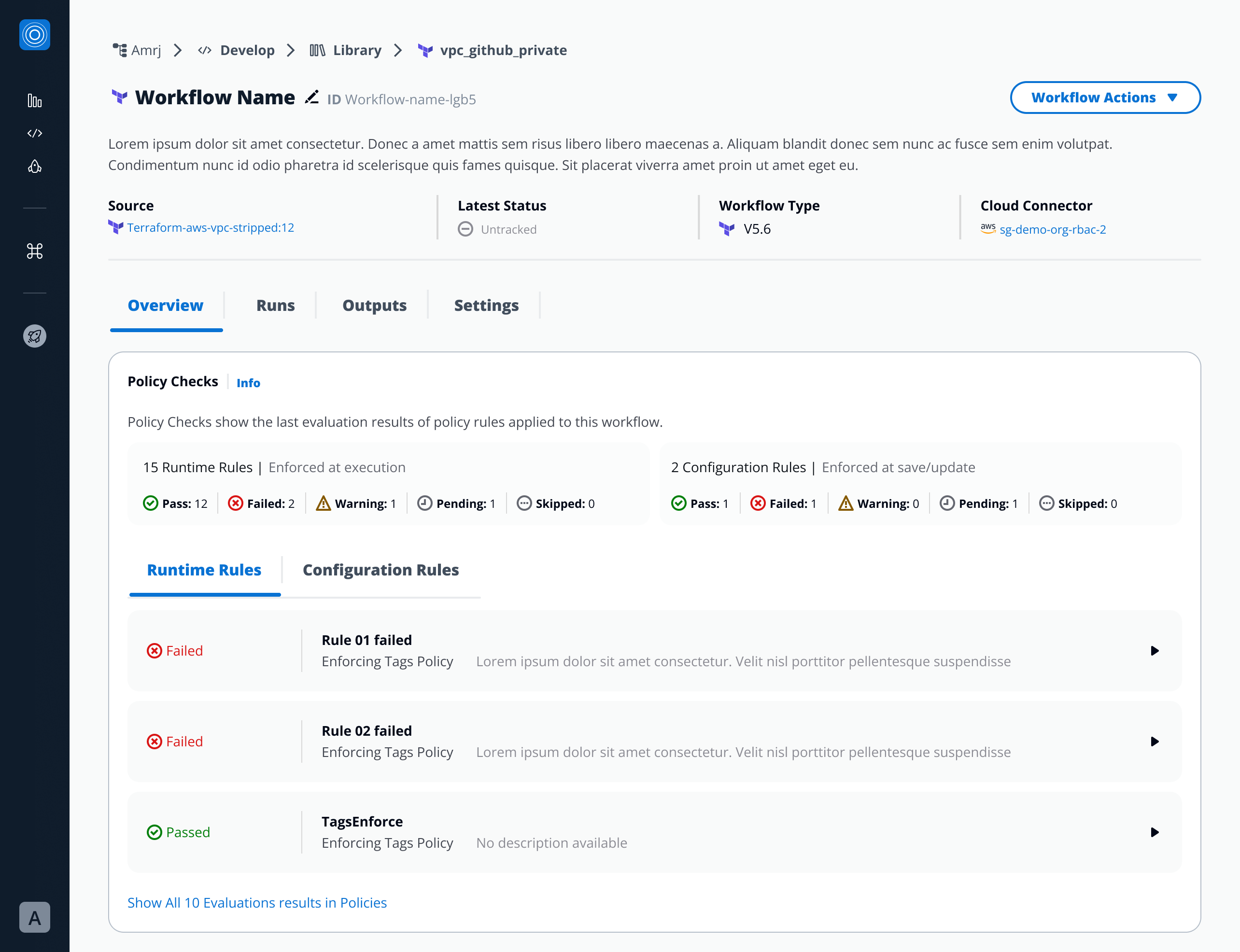
The Policy Checks feature provides organizations with a centralized, transparent way to enforce compliance and governance controls across Workflows and Stacks.
Located under each Workflow or Stack’s Policy Checks section inside the Overview tab, this feature helps teams validate actions, configurations, and runtime executions against predefined policy rules.
Key Features
1. Policy Rule Types
Policy Checks are divided into two categories:
-
Runtime Rules – Enforced during Workflow or Stack execution.
These validations run when a Workflow or Stack is executed, ensuring security and compliance in real time.
-
Configuration Rules – Enforced at configuration level, when a Workflow or Stack is created, updated or run.
Defined when the policy provider references a SG Workflow/Stack(JSON) provider.
2. Rule Cards and Status
Each rule appears as a collapsible card, showing:
- Policy Rule name
- Associated Policy
- Policy description
- Status
Expanding a card reveals more details about evaluation results once the policy has run.
Statuses include:
- Pass – The policy rule was successfully validated and met all defined conditions.
- Fail – The policy rule did not meet the defined conditions and was rejected.
- Warning – The rule triggered a cautionary condition but did not block execution or save.
- Pending – The rule requires explicit approval before proceeding. Approvals can only be granted during Workflow Runs.
- Skipped – Intentionally marked to be bypassed during evaluation.
- Unevaluated - The policy rule has not yet been checked. This state appears when no configuration change or execution has occurred since the rule was added.
- Runtime Rule results appear only after the Workflow or Stack has been executed.
- Configuration Rules results become visible after the configuration is saved or the workflow is run. They are always evaluated first so:
- If they fail, the run is blocked.
- If they pass or warn, the run continues, and runtime rules are then evaluated during execution.
- If a configuration rule requires approval, the run will only proceed once the approval is granted.
Notes from Developers
- Runtime Rules → evaluated dynamically during run execution.
- Configuration Rules → evaluated immediately at save, update, and again when a run is triggered (before runtime evaluation).
- Approvals → only available during Workflow Runs; not supported during metadata edits.
- Status visibility → updated only after at least one execution.
- Tabs → displayed dynamically based on rule presence (both or single type).
- Actions supported:
Pass,Fail,Warn,Approval Required,Unevaluated.
2. Infracost Estimation
Estimates the cost of infrastructure changes before deployment.
- Displays estimated cost based on detected resources.
- Shows:
- Total Estimated Cost
- Breakdown by resource or service:
- By default the on-demand cost per resource is shown
- When linking the infracost.io account to StackGuardian
This helps ensure cost visibility and control before applying infrastructure changes.
3. Resources
Lists all resources managed or created by the workflow.
- Displays name, type, status, and cloud provider details.
- Supports search, filter, and sort functions.
- Clicking a resource reveals details such as:
- Resource ID and type
- Provider
- Lifecycle state (created, updated, deleted)
- Cloud console link (if available)
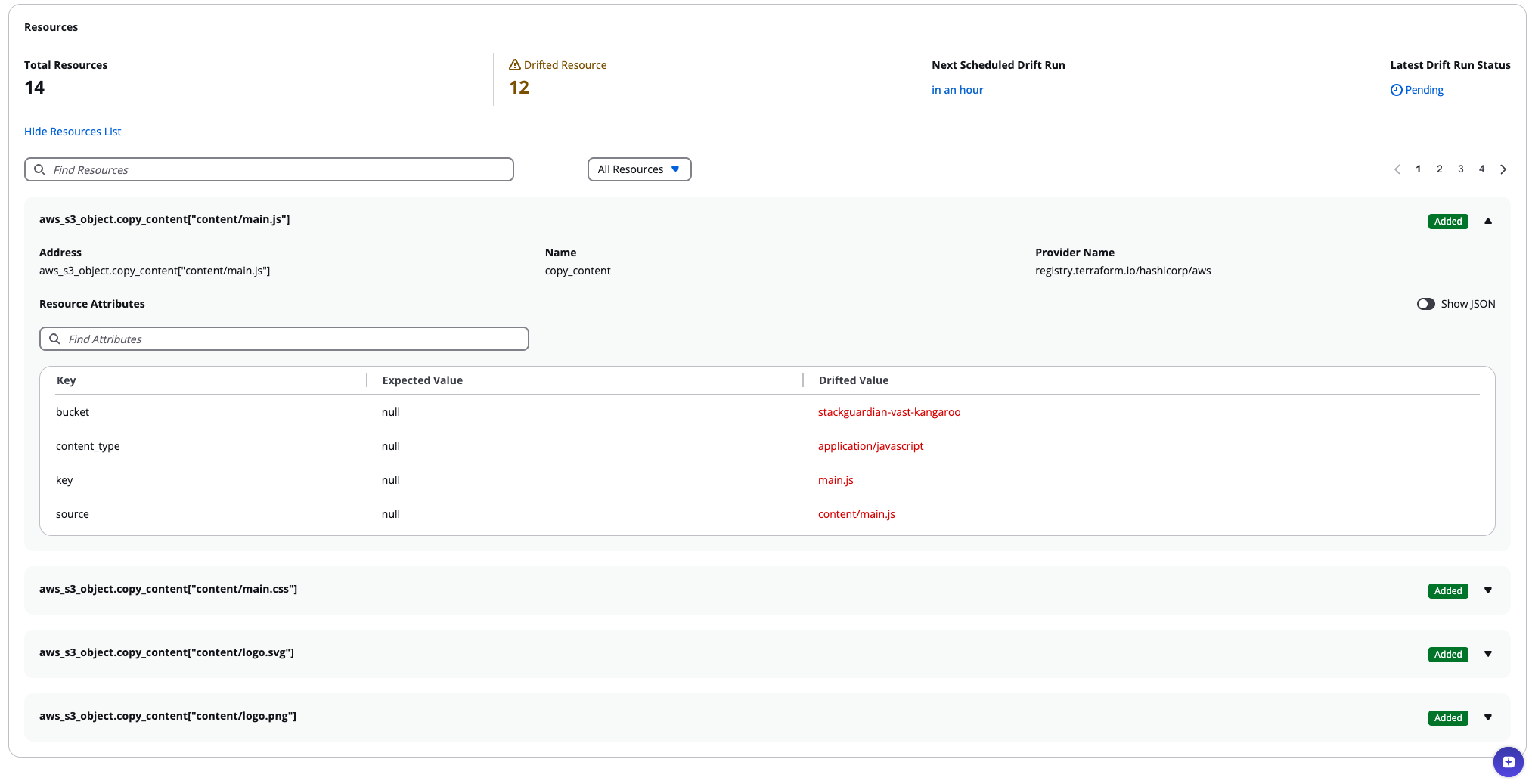
This section provides an instant view of what infrastructure the workflow manages.