7. Notifications
The Notifications section allows users to configure email alerts for workflow events such as execution errors or drift detection results.
This helps teams stay informed about issues or state changes without constantly monitoring the dashboard.
7.1 Overview
Under Settings → Notifications, you can assign one or more recipients for automated email updates.
| Feature | Description |
|---|---|
| Send Email on Error | Select users to be notified if a workflow run fails. |
| Send Email on Drift Detection | Select users to be notified when configuration drift is detected (for Terraform/OpenTofu workflows). |
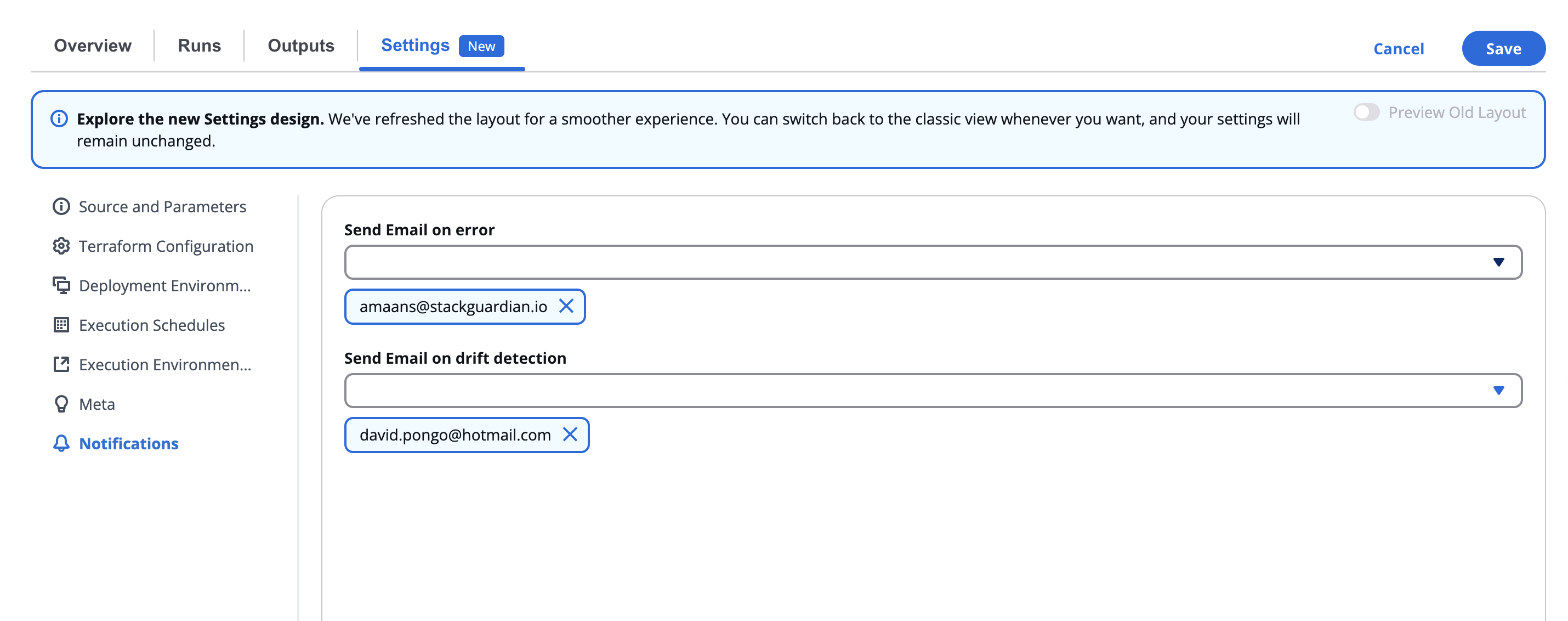
Both fields accept multiple recipients and provide an integrated search and selection interface.
7.2 Configuring Notification Recipients
Click inside either field to open a searchable dropdown list of available users.
- You can scroll or search for specific team members by name or email.
- Check the box beside each email to select one or more recipients.
- Once selected, they appear in the field as labeled chips.
✉️ The notification system ensures that the right stakeholders are automatically informed about workflow execution events, helping teams respond quickly to issues.
7.3 Use Cases
| Scenario | Recommended Setting |
|---|---|
| Build or deployment failure | Enable Send Email on Error for DevOps or Platform teams. |
| Terraform drift detection | Enable Send Email on Drift Detection for Infrastructure and Security teams. |