Execution Environment
The Execution environment section defines where and how your workflow runs — determining the compute resources, isolation, and scaling behavior of each execution.
You can choose between Shared Runners provided by StackGuardian or your own Private Runners for greater control over performance, security, and compliance.
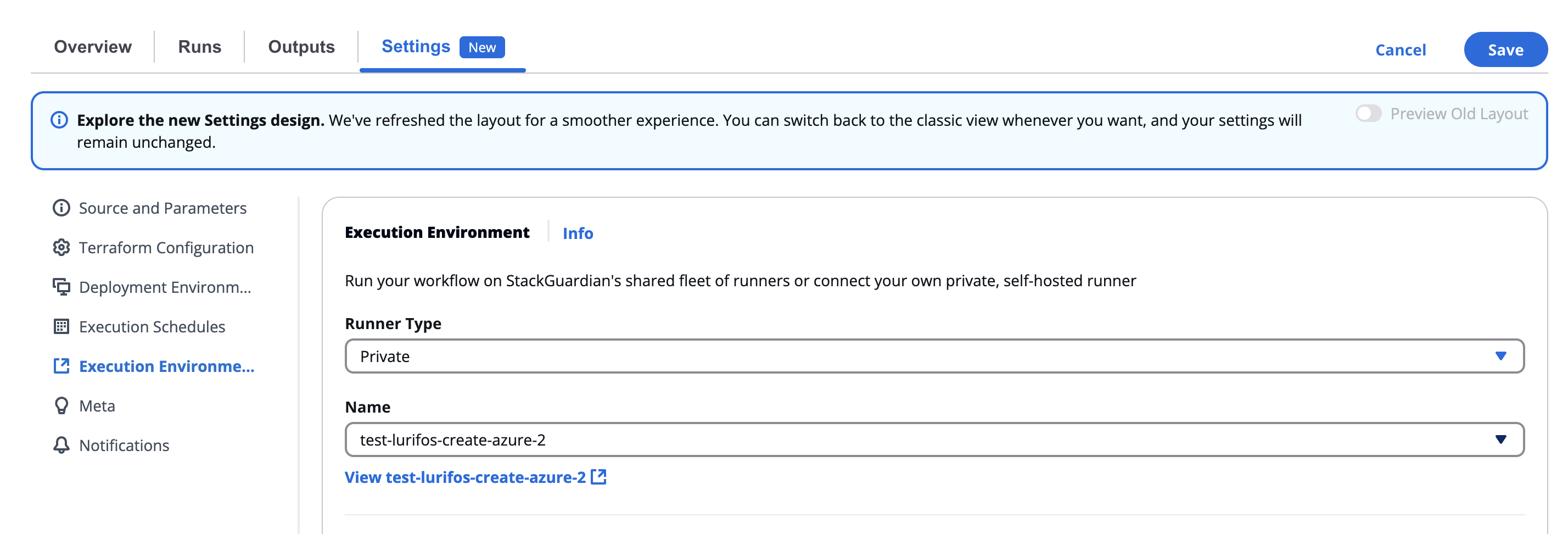
Execution environment section
Overview
Located under Settings → Execution environment, this section allows users to configure the runtime infrastructure for workflow executions.
This includes:
- Selecting the runner type (Shared or Private)
- Specifying the runner name (for Private)
- Allocating CPU and Memory resources for each workflow run
This configuration ensures that workflows run in the right environment — from lightweight shared runners for simple automation, to private, self-hosted runners for enterprise-grade workloads.
Runner type
Choose the type of runner your workflow will use:
| Runner Type | Description |
|---|---|
| Shared | Runs on StackGuardian’s shared fleet of managed runners. Ideal for smaller workloads, testing, or non-sensitive operations. |
| Private | Runs on your organization’s self-hosted or dedicated runners. Ideal for production workloads, secure environments, or large-scale jobs that need dedicated capacity. |
When switching between Shared and Private, the system will prompt you to confirm the change, as it may affect how workflow artifacts and states are stored.
Confirmation dialog example:
Ensure that the new runner has the same storage backend, as it will impact how workflow runs and artifacts are fetched during a run.
You can confirm by selecting Yes or cancel the change.
Private runner configuration
If Private is selected, a searchable list of available private runners appears in the Name dropdown.
| Field | Description |
|---|---|
| Name | Choose from existing private runners registered under your organization (e.g., test-resource123, test-azure, test-runner-group12). |
| Search bar | Quickly locate a specific runner by typing part of its name. |
| View link | After selection, you can click View [runner name] to open the runner’s details page. |
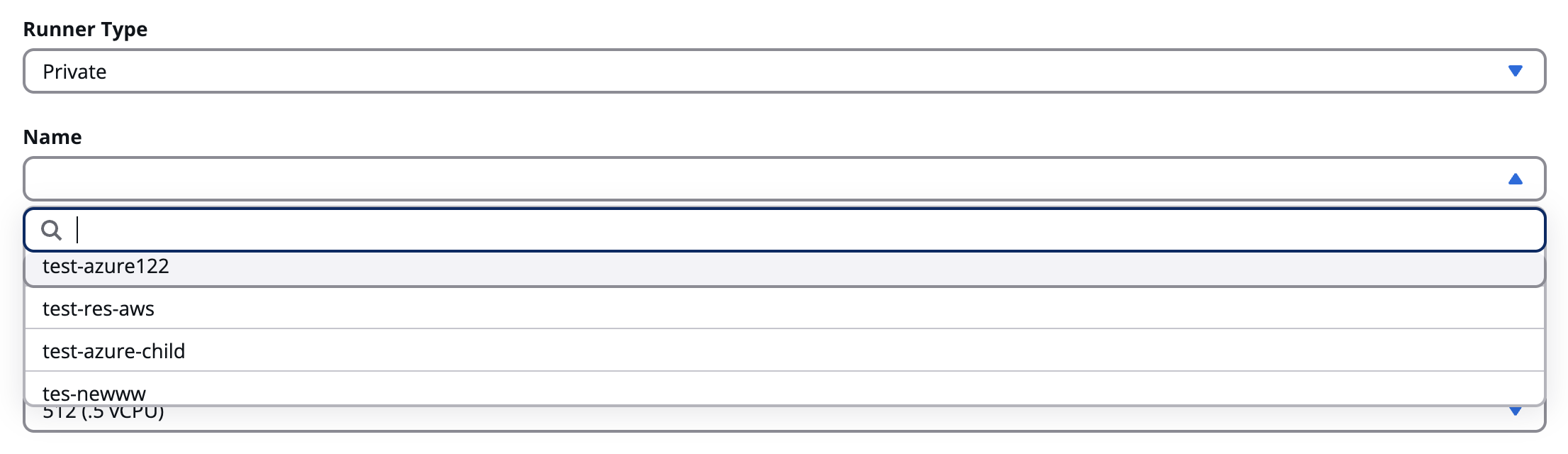
Private runner configuration
Use private runners to run workflows within your own network or infrastructure (e.g., AWS, Azure, or on-prem), maintaining full data isolation.
Resource configuration
Below the runner selection, you can define compute resources for the workflow’s execution container.
CPU
Specify the amount of CPU to allocate for the workflow’s runtime.
| Option | Description |
|---|---|
| 256 (.25 vCPU) | Lightweight jobs or testing tasks |
| 512 (.5 vCPU) (Default) | Standard compute level |
| 1024 (1 vCPU) | Moderate workloads |
| 2048 (2 vCPU) | Medium to heavy compute workflows |
| 4096 (4 vCPU) | High-performance tasks |
| 8192 (8 vCPU) | Intensive infrastructure automation workloads |

CPU
The default allocation is 512 (.5 vCPU). Increasing CPU allows faster workflow execution but consumes more resources.
Memory
Specify the memory (RAM) allocation per workflow run.
| Option | Description |
|---|---|
| 1 GB (Default) | Suitable for most small to mid-sized workloads |
| 2 GB | Ideal for multi-step or data-heavy tasks |
| 3 GB | Used for high-memory tools or container builds |
| 4 GB | For large or complex Terraform/Ansible workflows |
Choose the smallest configuration that safely supports your workflow’s operations. This ensures efficient cost and resource usage.
Concurrency
Allow parallel runs
By enabling this toggle, you let multiple runs of this workflow execute at the same time. Only enable this if your workflow is designed for concurrent access.
Changing runner configuration
When modifying the Runner type or Runner name, a confirmation modal appears to prevent accidental changes that might affect artifact storage or state data.
Modal warning:
“Please ensure that the new runner has the same storage backend, as it will impact how workflow runs and artifacts are fetched during a run.”
- Select Yes to confirm the change.
- Select Cancel to keep the previous configuration.
⚠️ If runners use different storage backends, switching between them may cause loss of cached data or require fresh setup for Terraform state synchronization.
Best practices
- Use Shared Runners for development, testing, or low-priority workflows.
- Use Private Runners for production pipelines, sensitive data handling, or specific network restrictions.
- Regularly monitor private runner performance and health in the organization’s Runner Management view.
- Match resource allocation to workflow complexity — avoid over-provisioning unless required.
- When using Terraform, ensure that runners maintain consistent storage backends for proper state access.