Overview
Runner groups allow you to create dedicated groups of runners for your organization. A private runner is a self-hosted instance that can be registered with StackGuardian to execute tasks and jobs within your organization's environment. This setup provides greater control and flexibility over task execution, allowing you to leverage your own infrastructure for running jobs securely.
Organization admins can also configure execution presets to define default values for execution environment and Terraform settings. These presets auto-populate when users create new workflows or templates, reducing configuration time and enforcing organizational standards.
For example, suppose you want to automate your CI/CD pipeline, including building, testing, and deploying applications. By creating a private runner group and registering your own instances as private runners, you can seamlessly integrate your existing infrastructure and tools, such as Jenkins or GitLab Runners, to efficiently execute the pipeline stages within your secure environment. If you configure execution presets to use your private runner group by default, all new workflows in your organization will automatically use your infrastructure without manual configuration.
Create a runner group
Verify that you have the necessary permissions and access rights within the StackGuardian Platform to create and manage private runners. This may involve administrative privileges or specific roles assigned to your user account.
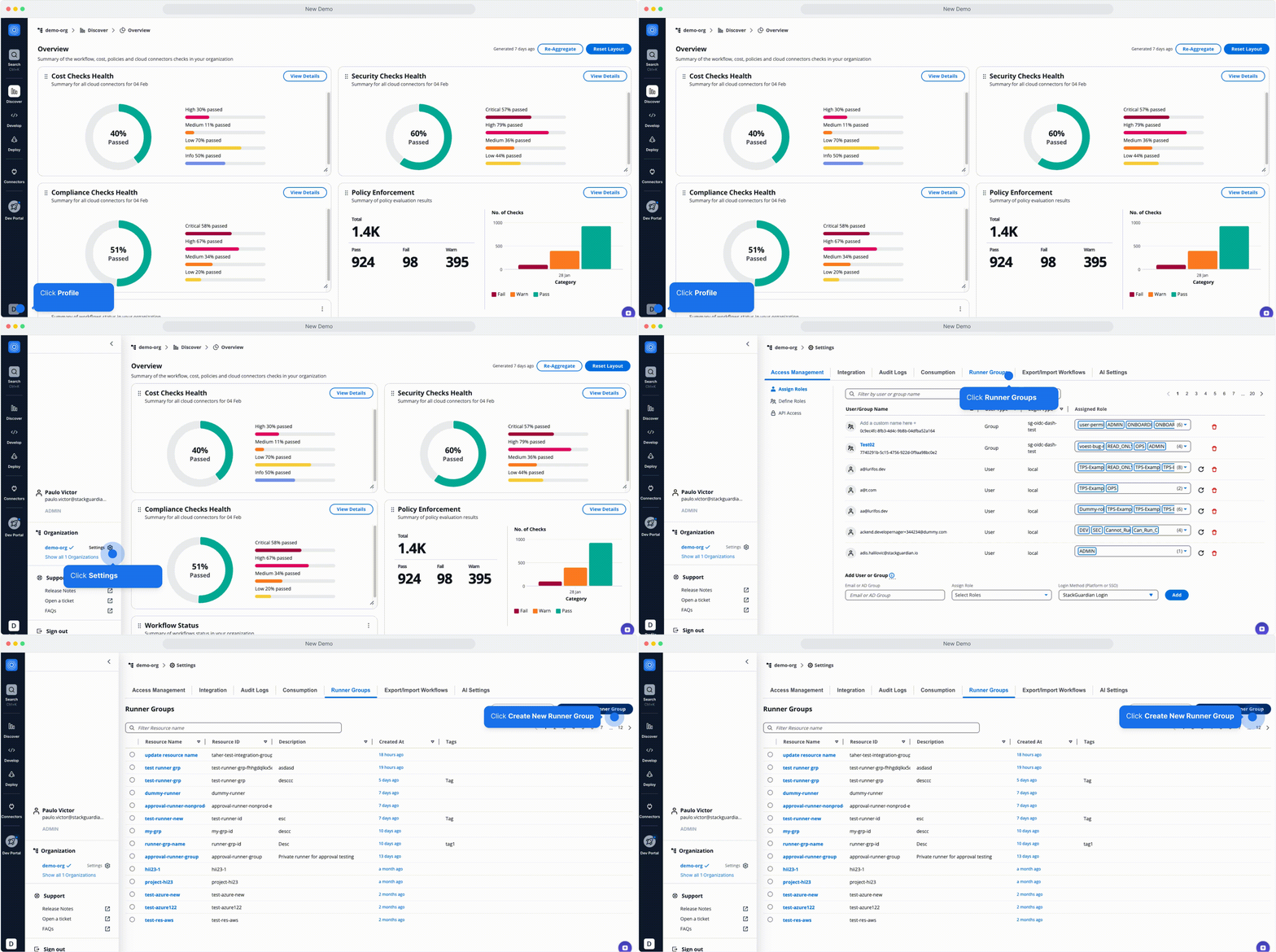
Create a Runner Group
You can configure a runner group with one of the two types of storage backends:
Execution presets
Execution presets define organization-wide default values for execution environment, Terraform, and OpenTofu settings. When users create new workflows or templates, these values auto-populate, reducing manual configuration and ensuring consistency across your organization.
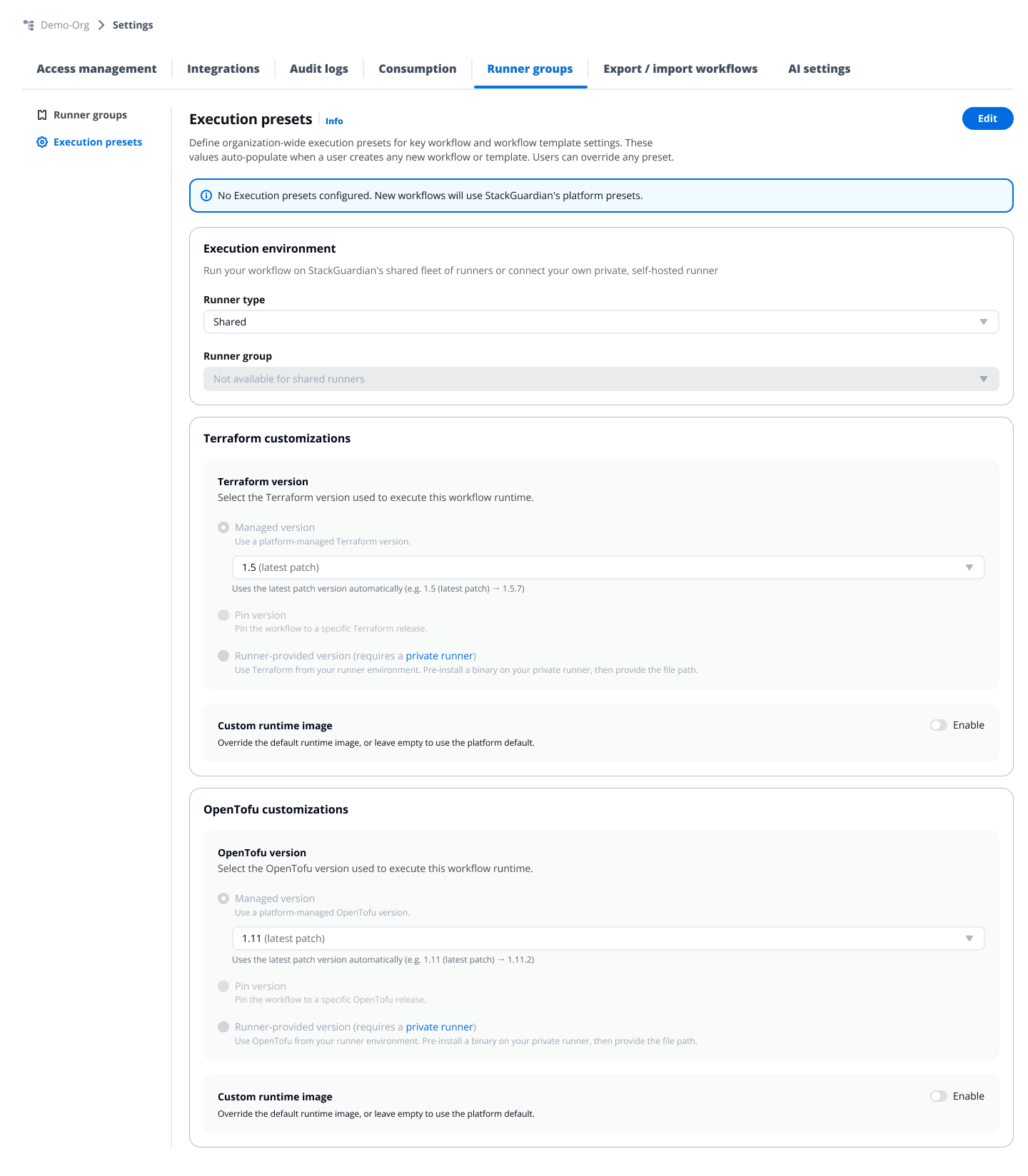
Execution presets
StackGuardian applies settings in this order of precedence:
- System/Platform presets — StackGuardian's default values (Shared runner, Managed Terraform version, custom runtime disabled)
- Execution presets — Organization-wide defaults configured by admins (override platform presets)
- Template settings — Configuration defined by template creators (override execution presets)
- User — Workflow creators can customize any setting (highest priority, overrides all previous levels)
Execution presets only apply to workflows and templates created after you define these presets. Workflows and templates that already exist are not affected.
Users can override preset values after creating workflows or templates by editing the workflow settings. Execution presets are defaults, not enforced policies.
- Runner type — Select Shared or Private
- Runner group — If Private is selected, choose which runner group to use by default
Terraform/OpenTofu customizations
- Terraform/OpenTofu version — Choose one:
- Managed version — StackGuardian automatically uses the latest patch version
- Pin version — Lock workflows to a specific Terraform/OpenTofu release
- Runner-provided version — Use Terraform/OpenTofu installed on your private runner (requires private runner and optional binary path)
- Custom runtime image — Enable to use a custom Docker image for workflow execution
- Click Save
StackGuardian offers Terraform up to v1.5.7. For newer versions, supply your own Custom Runtime Image or use a Runner-Provided Version.
Your execution presets are now active. New workflows and templates will inherit these values.
Reset to platform defaults
If you want to remove your organization's execution presets and return to StackGuardian's platform defaults:
- Navigate to Settings > Runner groups > Execution presets
- Click Edit
- Click Reset to platform defaults
- Confirm the action in the dialog
This clears all configured presets. New workflows will use StackGuardian's platform defaults (Shared runner, Managed Terraform version). Existing workflows are not affected.
How presets apply to workflows and templates
| Scenario | Behavior |
|---|---|
| Creating a workflow template | The system checks for execution presets and applies those values. If no execution presets are configured, platform defaults are used. Template creators can override any preset value in the template settings. |
| Creating a workflow from a template | The workflow inherits the template's execution settings, not the execution presets. Templates have higher precedence than execution presets in the hierarchy. |
| Runner group protection | If you select a specific runner group in your execution presets, that runner group cannot be deleted. This prevents configuration errors in new workflows. To delete the runner group, first update your execution presets to use a different runner group or reset to platform defaults. |