CloudFormation Workflow
A CloudFormation workflow allows IT teams to automate the deployment and management of AWS resources using Infrastructure as Code (IaC). It provides a structured way to define and provision infrastructure, ensuring consistency and scalability.
For example, when deploying an entire AWS stack, a CloudFormation workflow would handle the provisioning of resources such as EC2 instances, S3 buckets, and RDS databases, all defined in a template. This approach simplifies infrastructure management and ensures repeatable and reliable deployments.
Create a CloudFormation Workflow
Subscribe and use StackGuardian's cloudformation-template, which provides a pre-configured environment specifically designed for configuring CloudFormation workflows on the StackGuardian platform. It supports actions such as creating and executing change sets, deleting stacks, and performing drift detection. Following this guide, let's configure a CloudFormation workflow.
-
Navigate into the Workflow Group, click Create Workflow and choose "Use Wizard" > "Custom".
-
StackGuardian provides two options:
- Enable VCS settings to connect your code from the Git repository by providing the URL, then click "Next".
- Or simply, click "Next" to proceed without it.
- To create a Change Set, which allows to preview changes before applying them to a stack, click on "Add New Step" and enter the following details:
Creating a Changeset
- Step Name: Enter a relevant name, such as "create-Changeset".
- Workflow Step Template: Select
/stackguardian/cloudformation. - Workflow Step Template Revision: Choose the latest, e.g.,
cloudformation:1. - Command Override: Leave blank unless customization is needed.
- Stack Action: Select Create Changeset. This prepares a set of changes to apply to the stack.
- Stack Name: Enter the name or unique ID of the stack for which you're creating the changeset, e.g.,
vpc-22-apr. - Template File: Provide a valid JSON file located in the repository. Specify either the Template File or Template URL, not both.
- Template URL: Optionally, specify the URL of the template in an S3 bucket or Systems Manager document.
- Parameter File: Specify the file path or URL where the CloudFormation parameters file is located.
- CloudFormation Capabilities:
- CAPABILITY_IAM: Allows the creation of IAM resources.
- CAPABILITY_NAMED_IAM: Grants permission to create IAM resources with specific names.
- CAPABILITY_AUTO_EXPAND: Automatically processes nested stacks.
- To execute a Change Set, which applies the prepared changes to the stack, follow these steps:
Executing a Changeset
- Step Name: Enter a relevant name, such as "apply-Changeset".
- Workflow Step Template: Select
/stackguardian/cloudformation. - Workflow Step Template Revision: Choose the latest, e.g.,
cloudformation:1. - Command Override: Leave blank unless customization is needed.
- Stack Action: Select Execute Changeset. This applies the changeset to the specified stack.
- Stack Name: Enter the name or ID of the stack, e.g.,
vpc-22-apr. - Retain Except on Create: Check this box to ensure resources marked for retention are not deleted when rolling back.
- After configuring the steps, click Next to fill in the workflow metadata. Finally, click Next to launch the CloudFormation workflow.
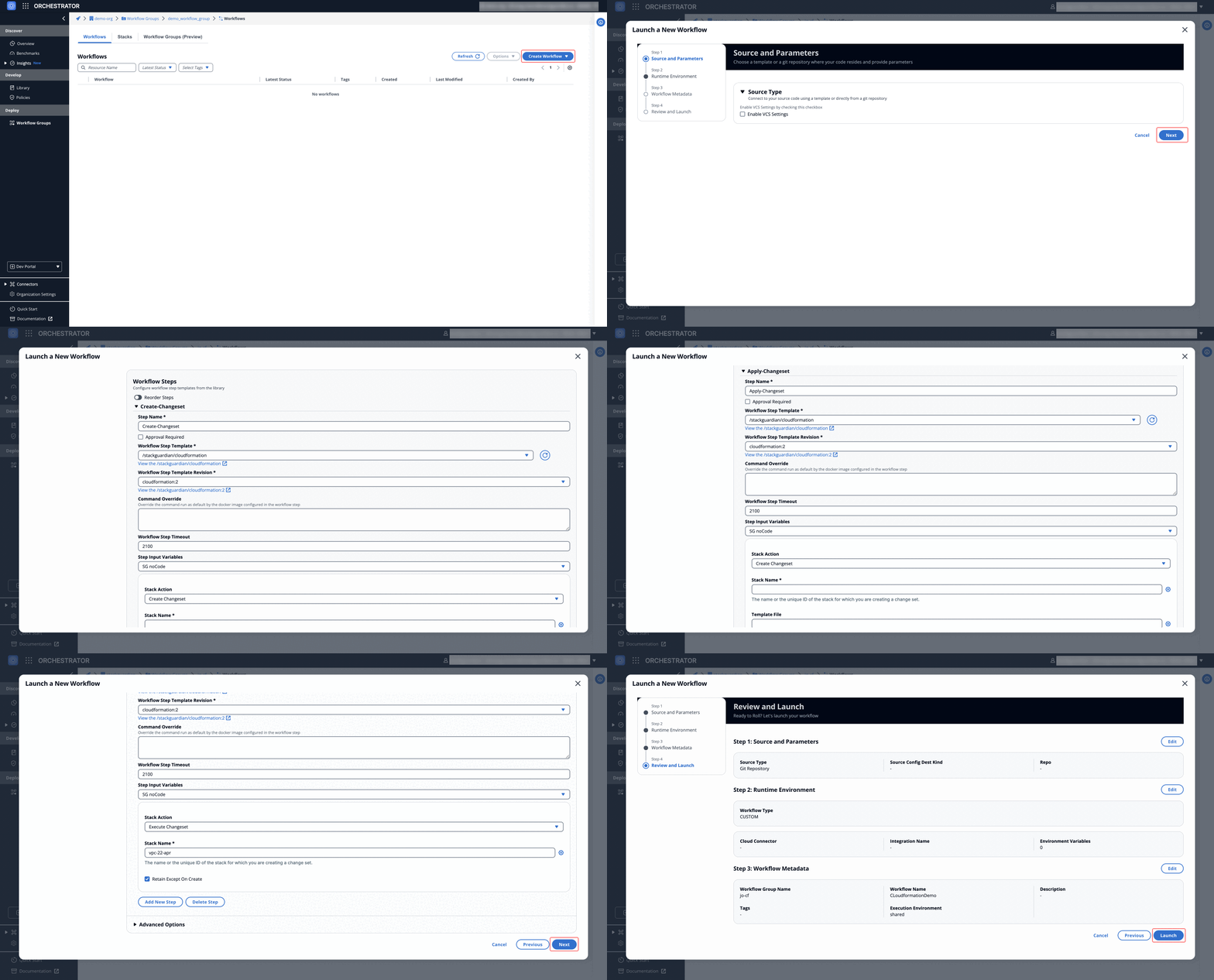
Fig: CloudFormation workflow example
Using this setup, you can create a flexible CloudFormation workflow to manage your stacks efficiently on the StackGuardian platform. Whether it's creating changesets, applying them, or checking for stack drift, this setup covers the essential fields and actions required for CloudFormation automation.
Dive into Workflow
StackGuardian workflows provide multiple tabs for monitoring, managing, and refining your deployments. Each tab offers specific insights and actions to optimize your workflow experience.
Overview
The Overview tab highlights key workflow details, including compliance check results, cost estimations, and resource summaries like drift detection and schedules. It offers a quick snapshot of your workflow's status.
Learn more in the Workflow Overview Guide.

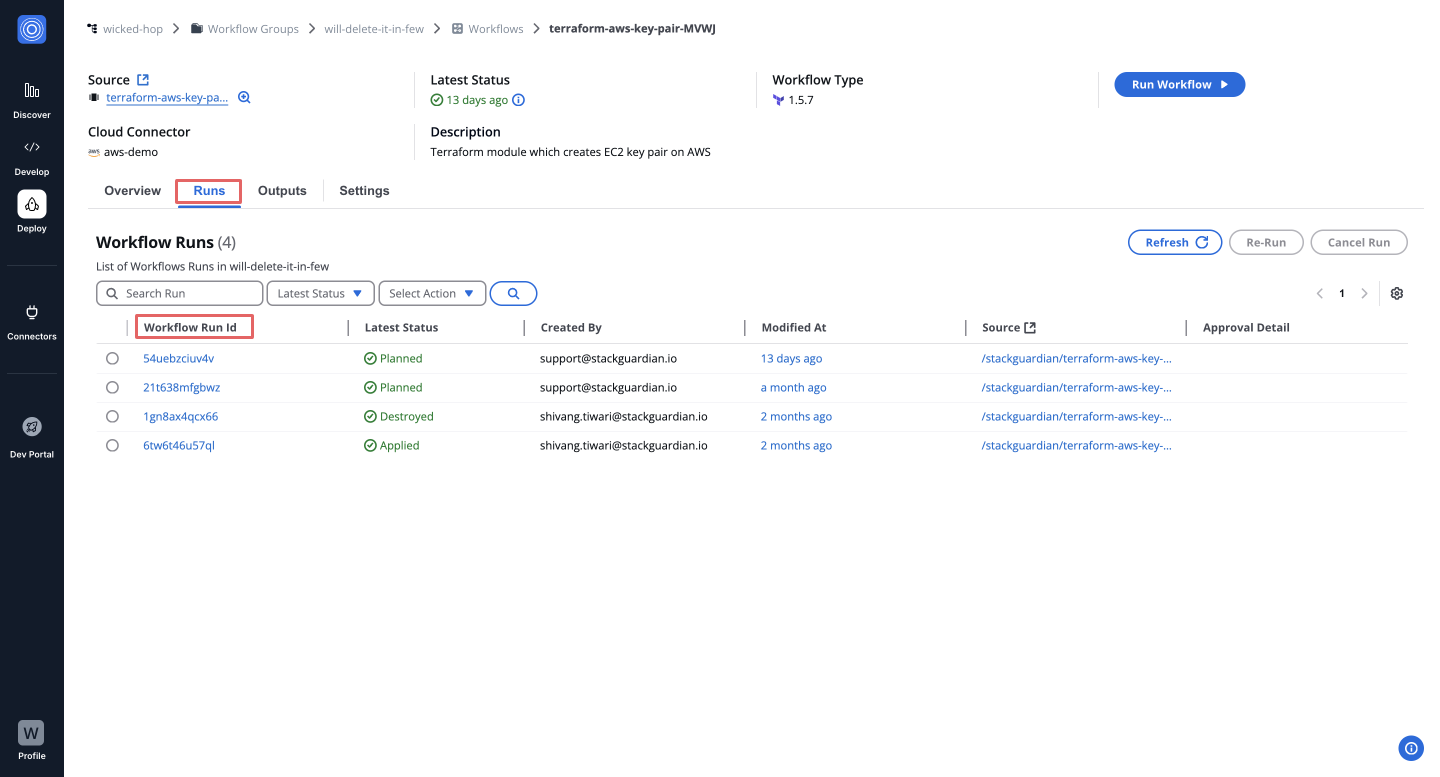
Runs
The Runs tab lists all executions with real-time status, unique run IDs, and metadata, such as user actions and modification timestamps. Click a Run ID to view detailed logs and execution progress.
Explore the Workflow Runs Guide.
Outputs
The Outputs tab displays execution results and downloadable artifacts like tfstate.json. Use key-value pairs to reference outputs in other workflows, making your infrastructure provisioning more dynamic.
See the Workflow Outputs Guide.

Settings
The Settings tab enables post-creation updates, such as modifying input variables, refining Terraform runtime settings, reordering custom steps, or managing cloud connectors and environment variables.
Learn more in the Workflow Settings Guide.
